
Integration
Prerequisites
Integrating the Payer Portal with a website requires several steps to be taken.
- A Payer Portal licence is required.
- The domain for the page hosting the form needs to be added to the Allowed Urls table.
- A generated API Key.
Adding an allowed URL
The URLs currently used by the customer are shown on the Hosted Form URLs table on the Collections\Portal\Configuration page accessible through the menu:
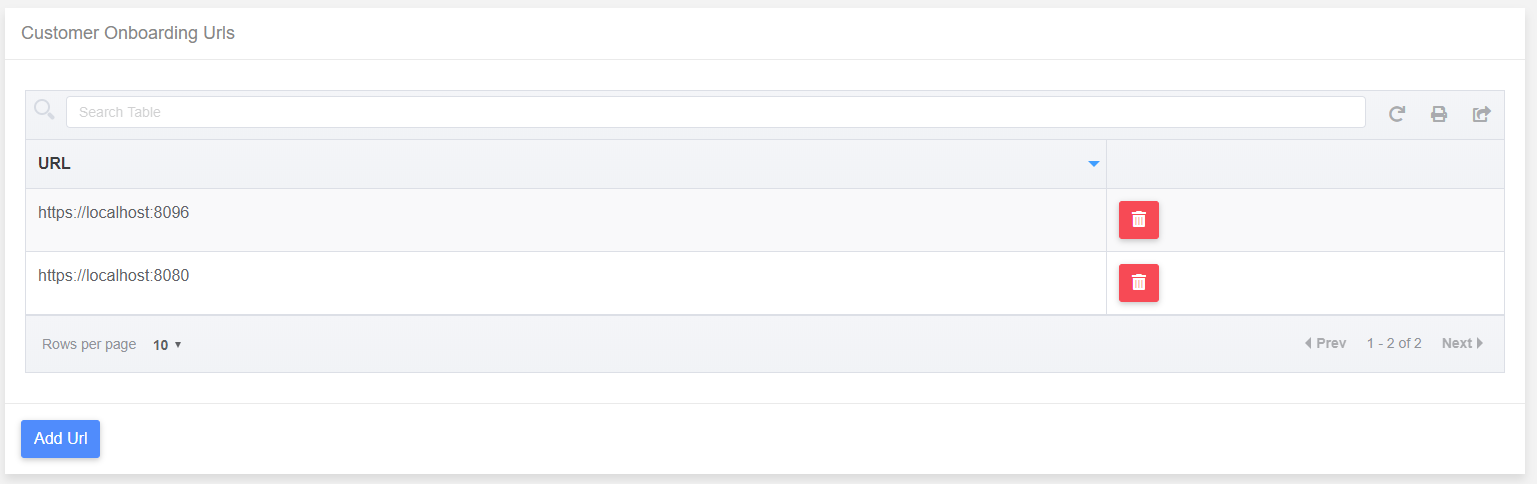 Adding a URL to table by pressing the Add Url button and entering data into the Add Url dialog will make that domain usable with the product.
Generating an API Key
From the Configuration Page, it is possible to generate an API key by scrolling to the API Access Key section and clicking the “Get” button linked to the empty text box, this will generate a new API key, which is automatically copied to the clipboard.
Generating a Session ID.
The recommended approach to generating a Session ID to be used to link the site to the portal it in server side code. A web request needs to be sent to the Payer Portal API using the Generated API Key for a specified customer, using the API Key in the request header. In the below example, Node.js is used to get a session id.
// express - to run js as web server
var express = require('express')

// axios to send web requests
var axios = require('axios')

// cors to allow cross origin scripting
var cors = require('cors')

// create a new instance of express
const app = express();

// configure the server to allow CORS.
app.use(cors())

// configure POST request from the hosted web page to create a session.
app.post('/api/createportalsession', async (req, res) => {
  try {
    let response = await axios.post(`https://localhost:5007/api/payerportal/createsession`, { }, { headers: {
      'X-PAYGATE-PORTAL-KEY':'##### YOUR API KEY #####',
      'Origin': '##### YOUR DOMAIN #####',
      'Referer': '##### YOUR DOMAIN #####'
    }})
    console.log(response.data)
    res.status(200).send(response.data)
  } catch (err) {
    console.log(err)
    res.status(err.response.status).send(err.response.data)
  }
})
const PORT = process.env.CUSTOM_PORT || 5002
// Make server listen on specified port.
app.listen(PORT)
Using The generated Session ID
Integrating the Payer Portal into a webpage requires the page to be able to run jquery, and be able to access the script used to run the form.
Below is a HTML which will be altered to render the form render the form.
<!DOCTYPE html>
<html lang="en">
  <head>
    <meta charset="utf-8">
    <meta http-equiv="X-UA-Compatible" content="IE=edge">
    <meta name="viewport" content="width=device-width,initial-scale=1.0">
    <title>Portal Test Page</title>
  </head>
  <body>
    <div id="app"></div>
  </body>
</html>
The form will be altered to include references to Jquery, and the Payer Portal form script.
<!DOCTYPE html>
<html lang="en">
  <head>
    <meta charset="utf-8">
    <meta http-equiv="X-UA-Compatible" content="IE=edge">
    <meta name="viewport" content="width=device-width,initial-scale=1.0">
    <title>Portal Test Page</title>
  </head>
  <body>
    <div id="app"></div>
    <script src="https://code.jquery.com/jquery-3.5.0.min.js" integrity="sha256-xNzN2a4ltkB44Mc/Jz3pT4iU1cmeR0FkXs4pru/JxaQ=" crossorigin="anonymous"></script>
    <script src="https://localhost:5007/cdn/paygate-collections-portal.min.js"></script>
  </body>
</html>
This page will then be altered so that when it loads, it will send a request to the previously defined node service to get a Session ID.
<!DOCTYPE html>
<html lang="en">
  <head>
    <meta charset="utf-8">
    <meta http-equiv="X-UA-Compatible" content="IE=edge">
    <meta name="viewport" content="width=device-width,initial-scale=1.0">
    <title>Portal Test Page</title>
  </head>
  <body>
    <div id="app"></div>
    <script src="https://code.jquery.com/jquery-3.5.0.min.js" integrity="sha256-xNzN2a4ltkB44Mc/Jz3pT4iU1cmeR0FkXs4pru/JxaQ=" crossorigin="anonymous"></script>
    <script src="https://localhost:5007/cdn/paygate-collections-portal.min.js"></script>
    <script>
      $(document).ready(function() {
        $.ajax({ url: '/api/createportalsession',
                 context: document.body,
                 method: 'POST',
                 success: function (response) {
                   console.log('Your session id is:' + response)
                 }})
      });
    </script>
  </body>
</html>
As the Session ID has been retrieved, it can now be used to render the Payer Portal to the page. In the success call, a new instance of the form is created, passing in the DOM selector for the element the form will be rendered into ‘#app’ and the session id.
<!DOCTYPE html>
<html lang="en">
  <head>
    <meta charset="utf-8">
    <meta http-equiv="X-UA-Compatible" content="IE=edge">
    <meta name="viewport" content="width=device-width,initial-scale=1.0">
    <title>Portal Test Page</title>
  </head>
  <body>
    <div id="app"></div>
    <script src="https://code.jquery.com/jquery-3.5.0.min.js" integrity="sha256-xNzN2a4ltkB44Mc/Jz3pT4iU1cmeR0FkXs4pru/JxaQ=" crossorigin="anonymous"></script>
    <script src="https://localhost:5007/cdn/paygate-collections-portal.min.js"></script>
    <script>
      $(document).ready(function() {
        $.ajax({ url: '/api/createportalsession',
                 context: document.body,
                 method: 'POST',
                 success: function (response) {
                   console.log('Your session id is:' + response)
                   var form = new PaygatePayerPortal('#app', { sessionId: response })
                 }})
      });
    </script>
  </body>
</html>
Once the startup script has executed, the portal will be rendered into the container, but at this stage the dimensions may be off:
IMAGE
This can be addressed by applying some styles to the hosting page:
<!DOCTYPE html>
<html lang="en">
  <head>
    <meta charset="utf-8">
    <meta http-equiv="X-UA-Compatible" content="IE=edge">
    <meta name="viewport" content="width=device-width,initial-scale=1.0">
    <title>Form Test Page</title>
    <style>

        html,
        body {
          margin: 0;
          padding: 0;
          height: 100%;
          width: 100%;
        }

        #app {
          height: 100%;
          width: 100%;
        }

      </style>
  </head>
  <body>
    <div id="app"></div>
    <script src="https://code.jquery.com/jquery-3.5.0.min.js" integrity="sha256-xNzN2a4ltkB44Mc/Jz3pT4iU1cmeR0FkXs4pru/JxaQ=" crossorigin="anonymous"></script>
    <script src="https://localhost:5007/cdn/paygate-collections-portal.js"></script>
    <script>
      $(document).ready(function() {
        $.ajax({ url: '/api/createportalsession',
                 context: document.body,
                 method: 'POST',
                 success: function (response) {
                   console.log('Your session id is:' + response)
                   var form = new new PaygatePayerPortal('#app', { sessionId: response })
                 }})
      });
    </script>
  </body>
</html>
With correct dimensions provided, the form will render fully.
IMAGE SHOWING RENDERED PAGE
Options:
There are a number of parameters that can be passed to the form:
apiKey: The API Key generated within the product, this can be used to generate a session id, but it would mean exposing your api key in client html.
sessionId: The session ID generated by providing an api Key to the API. Without a session id, the form will not render.
frameId: The DOM element ID to be used by the frame, defaults to portalFrame
onSuccess: Javascript method called on success, this can be done with an inline function when the code is used:
onSuccess: function (e) => { alert('success'); }
Or it can take methods that have been defined earlier:
  <script>
    function success (e) {
      alert('success');
    }

    function cancelled (e) {
      alert('cancelled');
    }
    $(document).ready(function() {
        $.ajax({ url: '/api/createsession',
                 context: document.body,
                 method: 'POST',
                 success: function (response) {
                   console.log('Your session id is:' + response)
                   var form = new PaygatePayerPortal('#app', { sessionId: response, onSuccess: success })
                 }})
      });
  </script>
In the event object returned by the success event are two parameters:
- success: a Boolean value indicating success.
- code: A success/error code.
onPageChange: Javascript method called when the portal pages change, this can be done either inline:
onPageChange: function(e) => { alert('page changed') }
Or it can take methods that have been defined earlier:
<script>
    function pageChange (e) {
      alert('page changed');
    }

    $(document).ready(function() {
        $.ajax({ url: '/api/createsession',
                 context: document.body,
                 method: 'POST',
                 success: function (response) {
                   console.log('Your session id is:' + response)
                   var form = new PaygatePayerPortal('#app', { sessionId: response, onPageChange: pageChange })
                 }})
      });
</script>
The event object returned by the page change event has two parameters: - pageChanged: a Boolean value indicating that the page has changed. - height: the current height of the iframe contents, this can be used to alter the height of the hosted iframe dynamically, so that internal scrolling within the page would be reduced, i.e.:
<script>
function pageChange (e) {
    if (e.pageChanged) {
        //resizes the portal frame
        $('#portalFrame').css('height', e.height+'px')
    }
}

$(document).ready(function() {
    $.ajax({ url: '/api/createsession',
                context: document.body,
                method: 'POST',
                success: function (response) {
                console.log('Your session id is:' + response)
                var form = new PaygatePayerPortal('#app', { sessionId: response, onPageChange: pageChange })
                }})
    });
</script>